← Custom Bot

SETUP GUIDE · ABOUT 5 MINUTES

Set up your custom bot step by step

You'll create your own bot application on Discord, connect it to Groyt's custom bot panel and add it to your server. No coding, no server rental and nothing to download; we run your bot.

  1. Activate your package
  2. Create the application
  3. Turn on intents
  4. Copy the token
  5. Connect to the panel
  6. Add to your server
  7. Start and customize
  8. Move from Groyt (optional)
0

Activate your package

Buy your package with Shopier from the Custom Bot section. Then log in to the Custom Bot Panel with Discord and enter your order number and the email you used when ordering. The order number is in the email Shopier sends.

💡 If you were given a code, just switch to the Code tab and paste it.
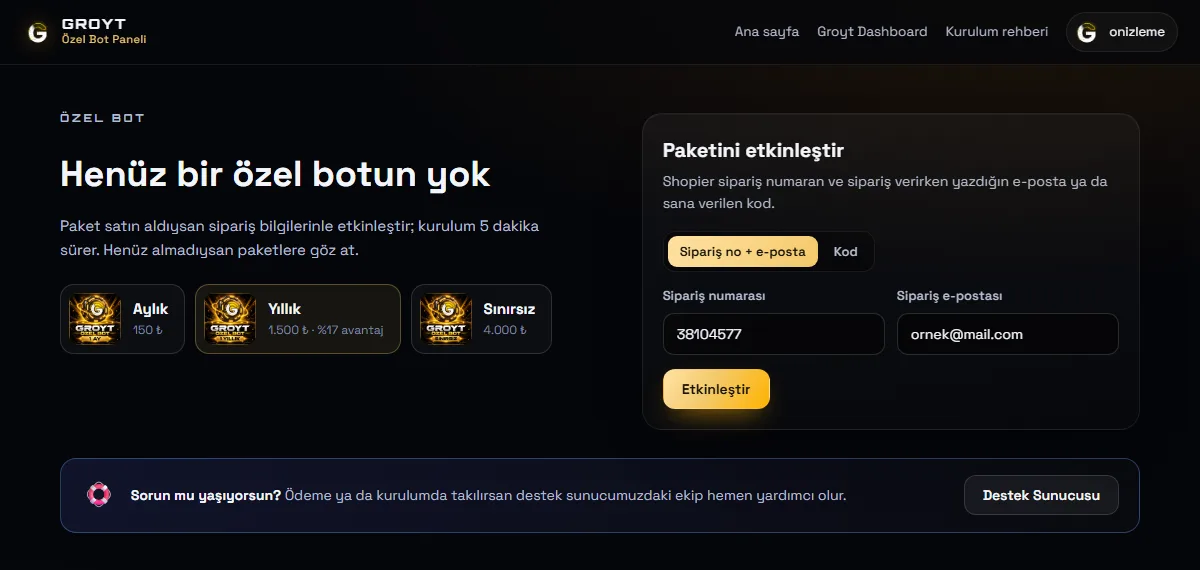
Package activation form in the Custom Bot Panel
Custom Bot Panel · activating the package
1

Create the application on Discord

  1. Go to discord.com/developers/applications and log in with your Discord account.
  2. Press the New Application button in the top right.
  3. Type a name (this becomes your bot's name; you can change it later from the panel), accept the terms and press Create.

⚠️ Create the application with your own account. The panel verifies through Discord that the bot belongs to you.

discord.com/developers/applications
ApplicationsNew Application
Create an application
Kral Bot
✓By clicking Create, you agree to the Discord Developer Terms…
CancelCreate
Illustration · the Developer Portal's look may change over time
2

Turn on the three intents

  1. Go to the Bot tab in the left menu.
  2. Scroll down and turn on the three switches under Privileged Gateway Intents: Presence Intent, Server Members Intent, Message Content Intent.
  3. Press Save Changes at the bottom.

💡 These three permissions are needed for features like music, levels, auto-moderation and status roles. Bots under 100 servers don't need Discord approval.

🔒 Optional: turn off Public Bot on the same page so nobody but you can add your bot.

Bot · Privileged Gateway Intents
General InformationInstallationOAuth2BotEmojis
Privileged Gateway Intents
Presence IntentRequired for your bot to receive Presence Update events.
Server Members IntentRequired for your bot to receive events listed under GUILD_MEMBERS.
Message Content IntentRequired for your bot to receive message content in most messages.
Careful — you have unsaved changes!Save Changes
Illustration · all three switches must be green (on)
3

Copy the token

  1. At the top of the same Bot tab, press Reset Token and confirm (a two-factor code may be asked).
  2. Copy the token shown with Copy.

🚫 The token is your bot's password. Don't share it with anyone or send it as a message on Discord. Only paste it into the token box in the Custom Bot Panel. Our team will never ask for your token in DMs.

Bot · Token
General InformationInstallationOAuth2BotEmojis
K
USERNAMEKral Bot
TOKEN
MTQwMDAwMDAw••••••••••••••••••••••.G••••.•••••••••
Reset TokenCopy
Illustration · the token is shown only once, when it's reset
4

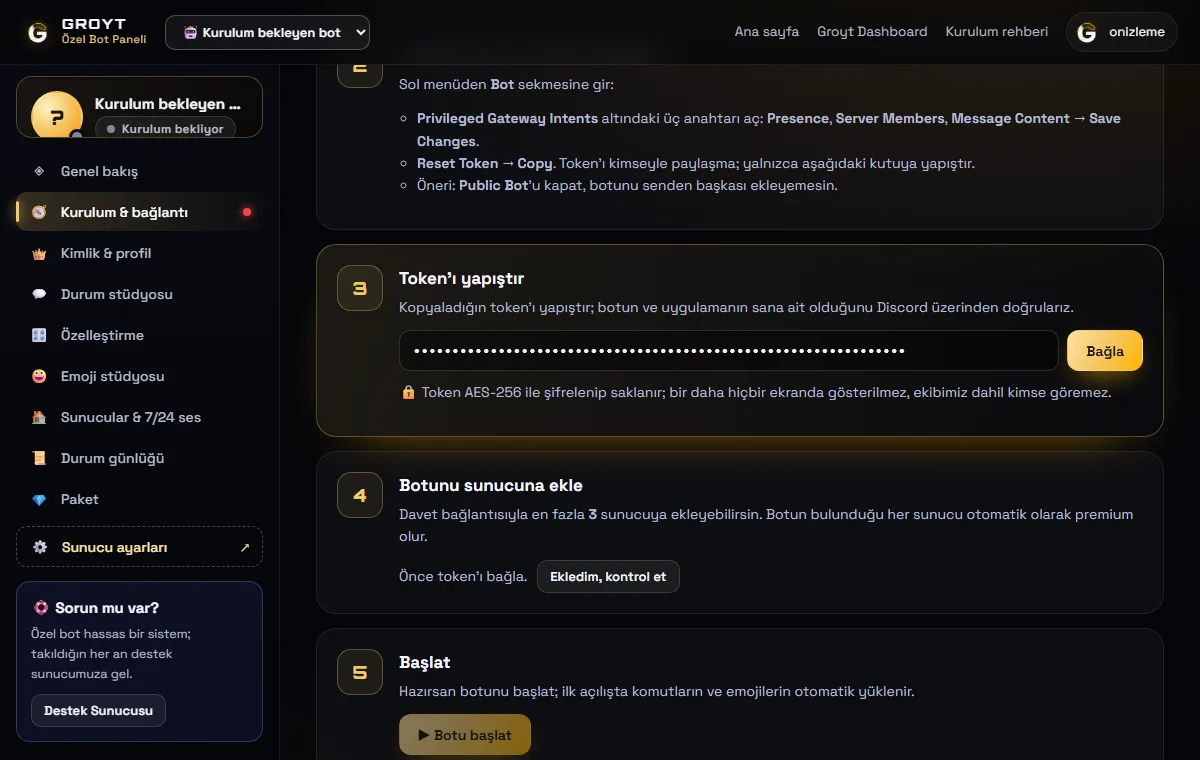
Connect the token to the panel

Paste it into the Custom Bot Panel → Setup & connection → Paste token box and press Connect. The panel checks three things through Discord:

  • Is the token valid, and is it really a bot?
  • Does the application belong to your account?
  • Are the three intents on? (If not, it shows which one is off; turn it on and press "Check again".)

🔒 The token is encrypted with AES-256; it's never shown on any screen again, and nobody, including our team, can see it.

Token connection step in the Custom Bot Panel
Custom Bot Panel · token and intent check
5

Add your bot to your server

Press Add to server in the panel; Discord's authorization page opens. Pick your server, then Continue → Authorize.

💡 Your custom bot works in at most 3 servers, and every server it's in becomes premium automatically. If it's added to a fourth server, it leaves by itself.

K⋯S
EXTERNAL APPLICATION Kral Bot

wants to access your Discord account

King's Server ▾
BackYetkilendir
Illustration · Discord authorization window
6

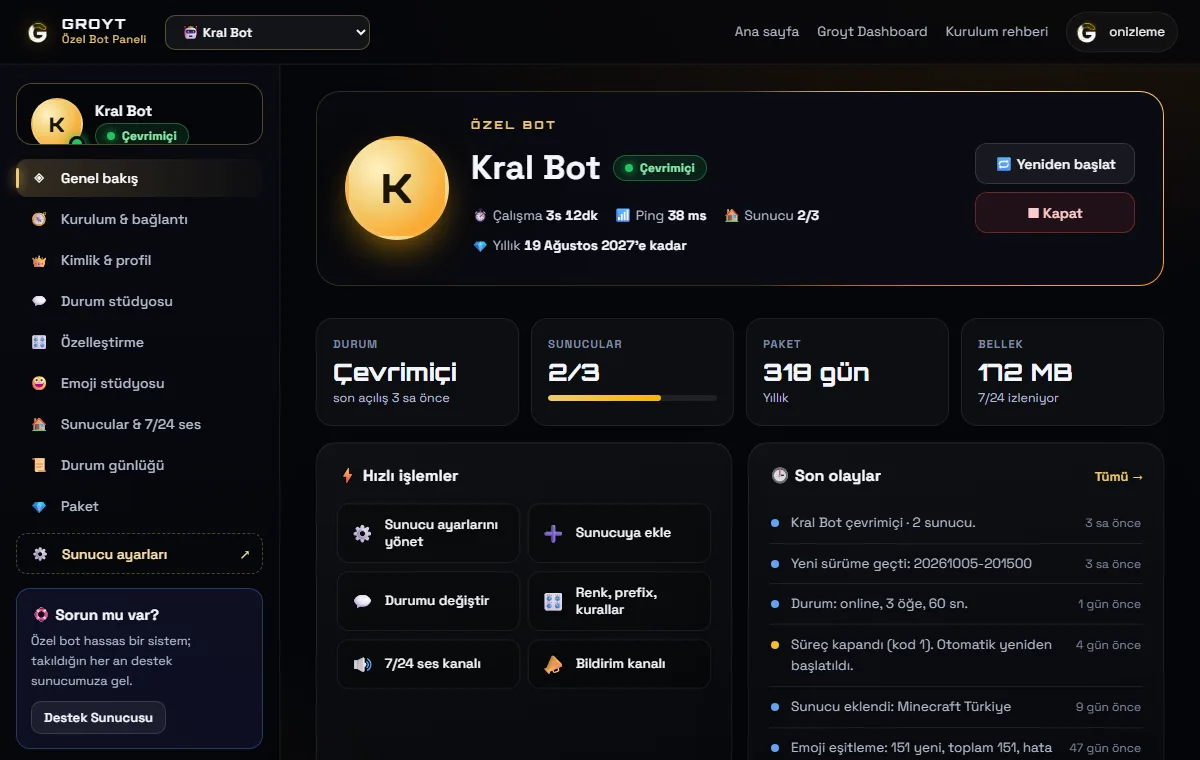
Start it and customize everything

Press Start bot; on first start your commands and emojis are installed automatically. Then from the panel:

  • Identity: name, profile picture, banner, "About me".
  • Status studio: playing/watching/listening/competing/streaming and a custom status bubble, rotating in turn.
  • Customization: colors, prefix, channel/category/role names and text rules.
  • Servers: the voice channel it waits in 24/7.
  • Status log: the channel for started/stopped notifications.
  • Server settings: all of Groyt's settings screens, for your custom bot.
Custom Bot Panel overview screen
Custom Bot Panel · overview
7

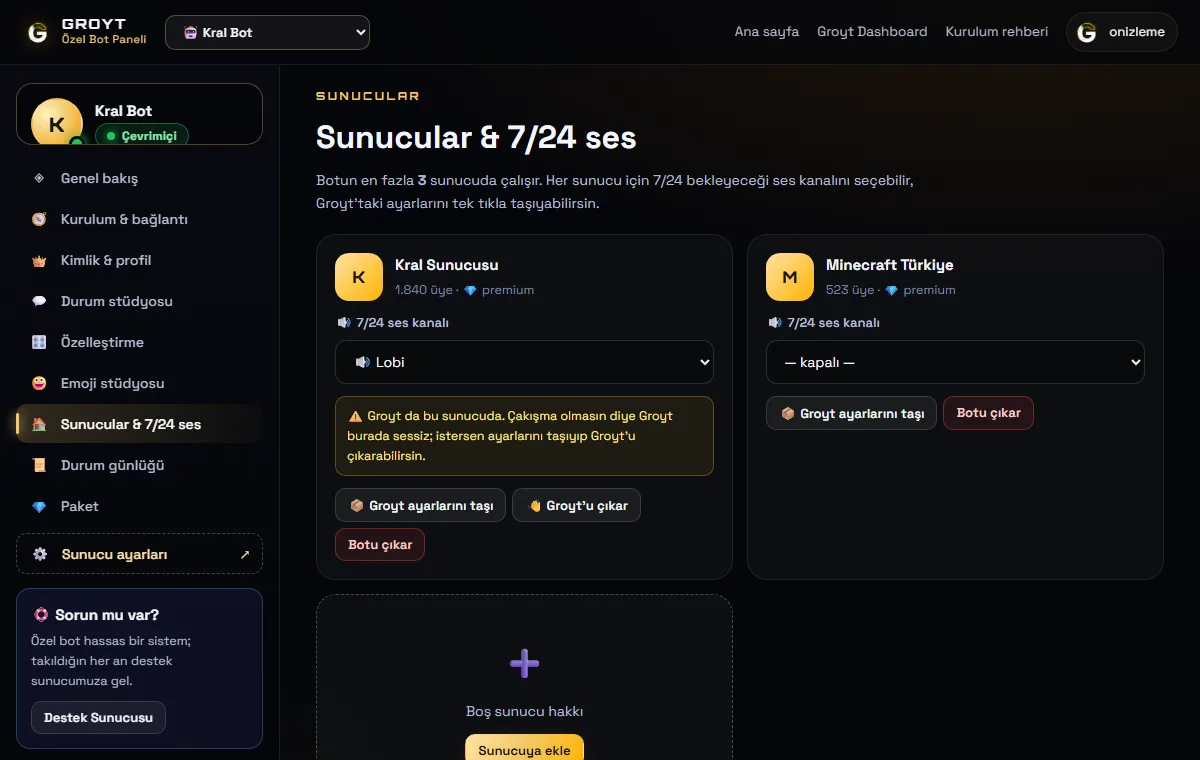
Move from Groyt (optional)

If Groyt is in your server, your settings, levels and economy move to your custom bot in one click with Servers → Move Groyt settings in the panel. If "Remove Groyt" stays checked, Groyt leaves the server; the same message won't come twice.

💡 Even if you don't remove Groyt, Groyt stays quiet in that server as long as your custom bot is on.

Custom Bot Panel servers and 24/7 voice screen
Custom Bot Panel · servers and 24/7 voice

FAQ

Is my token safe?

Yes. The token is sent only over HTTPS, stored encrypted with AES-256-GCM, and never shown again on any screen, log or email. If you regenerate your token, Discord invalidates the old one; connect the new one with "Renew token" in the panel.

Why does the bot say "Intents are off"?

One of the three switches in Developer Portal → Bot tab is off, or "Save Changes" wasn't pressed. Turn it on and save, then press "Check again" in the panel.

What happens if the bot goes down?

Your bot is monitored 24/7; if it goes down unexpectedly it restarts itself within seconds. If you chose a status log channel you also get "stopped/started" notifications. If it goes down many times in a row, our team is notified automatically.

Paketim bitince ne olur?

Reminders come 7, 3 and 1 day before it ends. When the time runs out the bot keeps running 3 more days, then it's suspended. Your settings and data aren't deleted; the moment you renew it comes back with the same settings.

How do I get the Active Developer badge?

Since the application belongs to your account, you can qualify for the badge. While your bot is on, use any slash command in a server (e.g. /help), then apply from discord.com/developers/active-developer. It can take up to 24 hours for Discord to detect the command usage.

Really no rate limit trouble?

Your custom bot runs with its own Discord account and its own API quota; Groyt's load doesn't slow it down and no command cooldown applies.

Ready?

If you've finished the setup, start personalizing your bot. Our support server is there for you wherever you get stuck.